Published · 8 min read
Meta Instant Forms vs Website Leads: Which Brings Booked Work?
Instant forms can bring more leads and website forms can bring better ones, so test both. How a small business can compare the two on booked jobs, not lead count.
By the AdvisorPPC Team · Reviewed by Claude
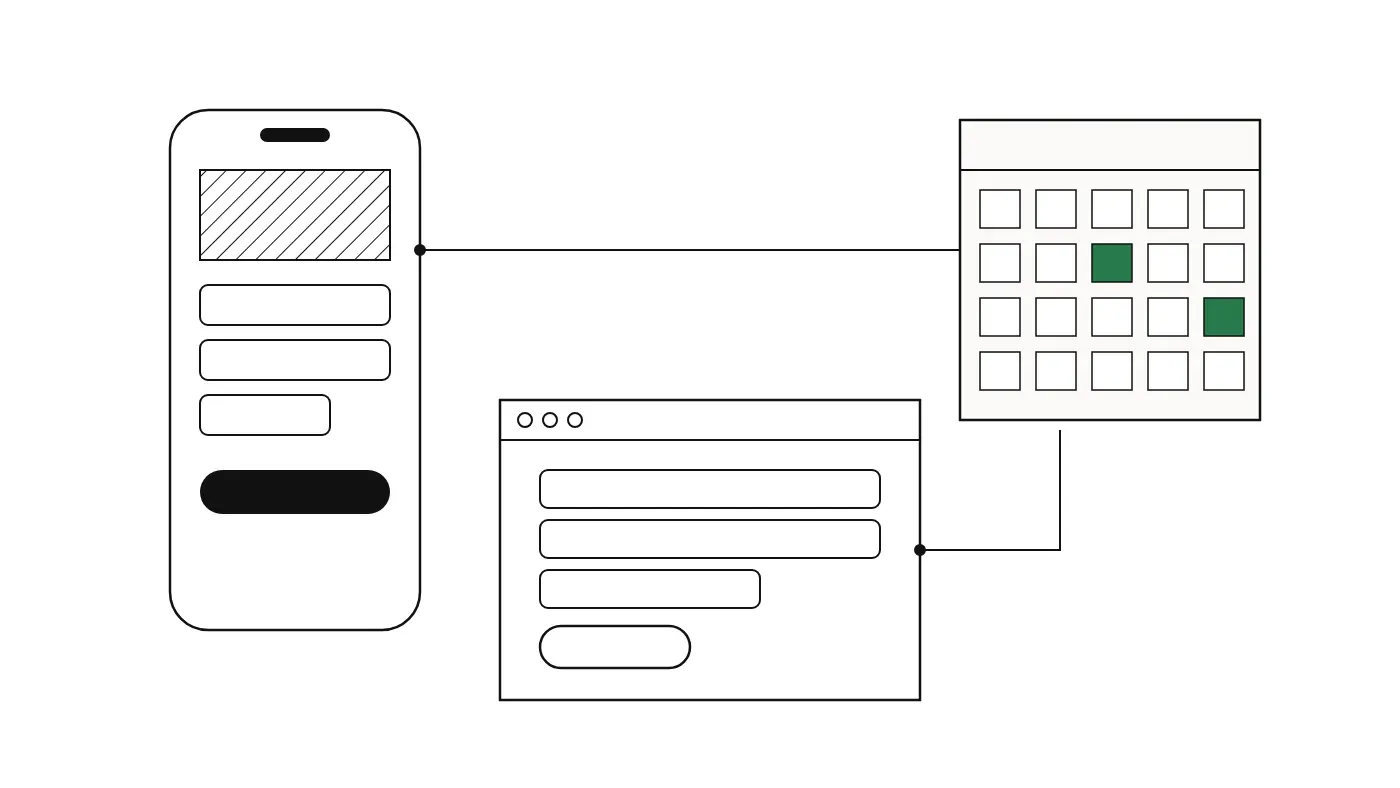
When you run a lead campaign on Facebook or Instagram, one of the first choices is where the enquiry happens. An instant form lets someone send their details without leaving the app. A website form sends them to your own page first. Both can work. They tend to produce different kinds of lead, and the only fair way to choose is to follow each lead through to whether it became paid work.
This guide explains the trade-off in plain terms, shows a worked example, and gives you a simple method for testing the two side by side on your own account.
What is the difference?
An instant form opens inside Facebook or Instagram. The person taps your ad, sees a short form, and sends it. They never load your website. That removes a step, which can mean more people finish. It also removes the moment where they read about you, look at your prices or photos, and decide whether you are the right fit.
A website form asks the person to visit your page and fill in a form there. Some people drop out on the way: the page is slow, the form is long, or they simply get distracted. The people who do finish have usually seen more of your business, which may mean they are further along in their decision. Test it on your own account rather than assume it.
| Instant form | Website form | |
|---|---|---|
| Where the enquiry happens | Inside Facebook or Instagram | On your own website |
| Effort for the person | Low | Higher |
| Typical lead volume | Higher | Lower |
| How much of your business they saw first | Only the ad and the form | The ad plus your page |
| What you must set up | Form questions and a way to receive leads quickly | A fast page, a working form, and tracking |
Why lead count is the wrong scoreboard
Ads Manager reports leads, and cost per lead is the number most people look at first. It is the wrong scoreboard for this choice. A lead that never answers the phone costs you money and time. A lead that books a job pays for several that did not.
So follow each lead through four stages: the lead arrives, you reach the person, they turn out to be a real fit for your service, and they book paid work. Count each stage separately for each form type. The comparison that matters is at the end, booked jobs and cost per booked job, not at the start.
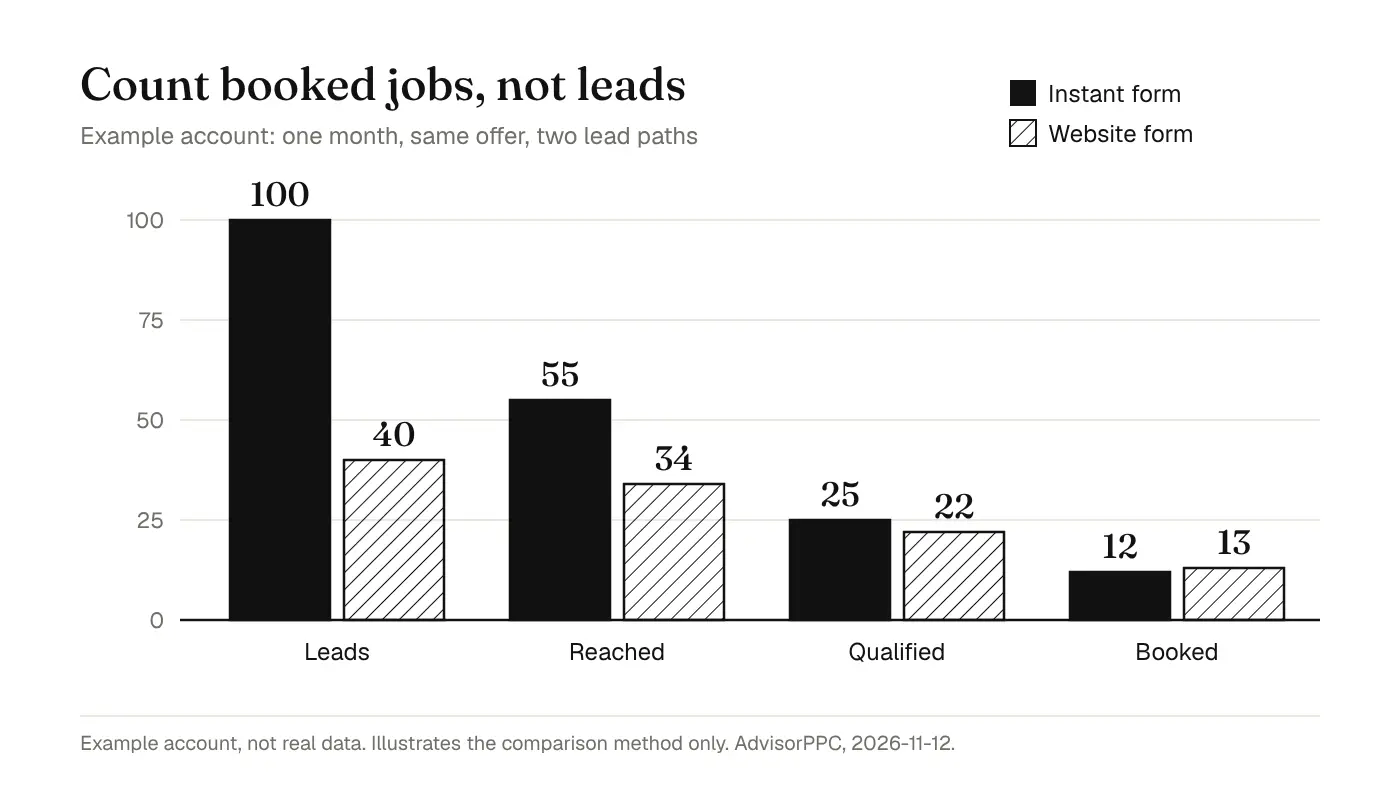
In this example account, the instant form brought 100 leads in a month against 40 from the website form. That looks like an easy win. But only 55 of the instant form leads could be reached, and 12 booked. The website form reached 34 people and booked 13. If both paths cost the same, the website form produced slightly more paid work from far fewer leads, and far less time spent chasing people who were not ready.
The opposite result is just as possible on your account. Some services suit a quick form well: a free quote for a common job, a callback request, a seasonal check. Others need the person to understand more before they enquire. The point of the example is the method, not the winner.
Set up a fair test
- Use the same offer, the same audience and similar creative for both. If the offer changes, you are testing the offer, not the form.
- Run the two as separate ad sets or campaigns so the results do not mix, and give each a budget large enough to collect a meaningful number of leads. Our guide to how much to spend on Meta Ads shows how to work out that number.
- Label every lead with its source the moment it arrives. A column in your enquiry sheet that says instant form or website form is enough.
- Call back on the same schedule for both. If instant form leads wait two days and website leads get a call within the hour, the test is measuring your follow-up, not the form.
- After a few weeks, fill in the four stages for each path and compare cost per booked job.
Remember that every new ad set goes through Meta's learning phase while delivery settles. Read Meta's learning phase guidance and our Meta learning phase guide before you judge the first few days.
Make instant form leads better
If instant forms bring volume but too few booked jobs, the fix is often inside the form rather than a switch to the website.
- Ask one question that filters, such as the postcode or area, the type of job, or when they need it. A question that takes a moment of thought weeds out accidental taps.
- Say plainly what happens next: who will call, and roughly when. People who know a call is coming are more likely to answer it.
- Check the form options Meta offers in your Ads Manager for adding a review step or more friction. Settings change, so look at what your account shows rather than a guide from last year.
- Get the leads to someone fast. A lead that sits in a download for a week is worth less than one that rings a phone within minutes.
The same spam and quality problems show up on Google's lead forms, and the checks in our lead form spam filtering guide translate well to Meta.
Make website leads easier
If the website path brings good leads but too few of them, look at the page before you give up on it.
- Send people to a page about the service in the ad, not your home page.
- Keep the form short. Ask for what you need to call them back and qualify the job, and nothing else.
- Make the page fast on a phone. Check the device breakdown in Ads Manager; if most of your clicks come from phones, our mobile landing pages guide covers the common fixes.
- Make sure the form submission is recorded. Without it, Meta cannot tell which people to look for next.
Track both paths properly
Instant form leads are recorded inside Meta, because the form lives there. Website leads depend on your own tracking: the Meta Pixel in the browser, and ideally the Conversions API from your server. If the website form is not tracked, Meta sees clicks but no results and the comparison is unfair from day one. Our Meta Pixel vs Conversions API guide explains how to check both.
For the stages after the lead, reached, qualified and booked, your own records are the source. Meta does not know which caller booked a job unless you tell it. Until you have a way to send that back, keep the sheet, and judge the two paths from it.
Which should you start with?
If your website is slow or thin, start with instant forms, add a filtering question, and fix the follow-up first. If you already have a fast, specific service page with tracking that works, start with the website and add an instant form test once you have a baseline. Either way, decide on cost per booked job after a fair test, not on lead count after a week.
Are instant form leads lower quality?
Often they need more filtering, because sending one is so easy. That does not make them worse for every business. Compare booked jobs per path on your own account before deciding.
Can I use both at once?
Yes. Many businesses keep both running as separate ad sets and move budget toward whichever path produces paid work at a lower cost. Keep them separate so the results do not blur.
Can an AI assistant compare the two for me?
It can read the lead counts and costs from your account and combine them with your own booked-job records if you share them. Any budget move it proposes should wait for your approval, as described in approve every change.
The funnel figures in this guide are an example account, not real customer data and not a forecast. Meta's form options and rules change; this guide asserts none of them, and the linked Meta pages are the current source. Written 2026-11-12.