Published · 8 min read
How Much Should a Small Business Spend on Meta Ads?
Work out a Meta Ads budget from your own numbers: profit per job, close rate and the most you can pay per lead. With a calculator and a worked example.
By the AdvisorPPC Team · Reviewed by Claude
Most advice on Facebook and Instagram budgets starts with a number someone else picked. A better starting point is your own business: what a customer is worth to you, how many enquiries turn into paid work, and how much of that profit you are willing to hand to advertising. Those three numbers tell you the most you can pay for a lead. The budget follows from that, not the other way round.
This guide walks through the sum, gives you a calculator to run it with your own figures, and shows how to set a first test budget on Meta that is large enough to learn something and small enough that you can afford to be wrong. It is written for owners of service businesses and small shops, not for agencies managing large accounts.
Start with what a customer is worth
Use gross profit per job, not revenue. If a typical job brings in 1,000 but materials, staff time and travel cost 600, the job is worth 400 to you. Spending 300 on ads to win that job leaves 100. Spending 500 loses money even though the revenue figure looks healthy.
If customers come back, you can use profit over a realistic first year instead of a single job. Be honest here. Repeat business you hope for is not the same as repeat business you can see in your records. When in doubt, use the single-job figure for your first test and revisit it once you have data.
The same reasoning sits behind our guide to ROAS and contribution margin, which goes deeper on margin for shops that sell products rather than services.
Then find your close rate
Your close rate is the share of enquiries that become paid work. Count it from your own records over the last few months: enquiries in, jobs booked out. If you do not track it, start now with a simple sheet that lists every enquiry, where it came from, and whether it turned into a job. Two or three weeks of honest counting beats a guess.
Expect the close rate from a new channel to differ from your overall rate. People who find you through a referral are usually further along than someone who tapped an ad between other posts. That is not a reason to avoid Meta. It is a reason to measure Meta leads separately rather than assume they behave like the rest.
The most you can pay per lead
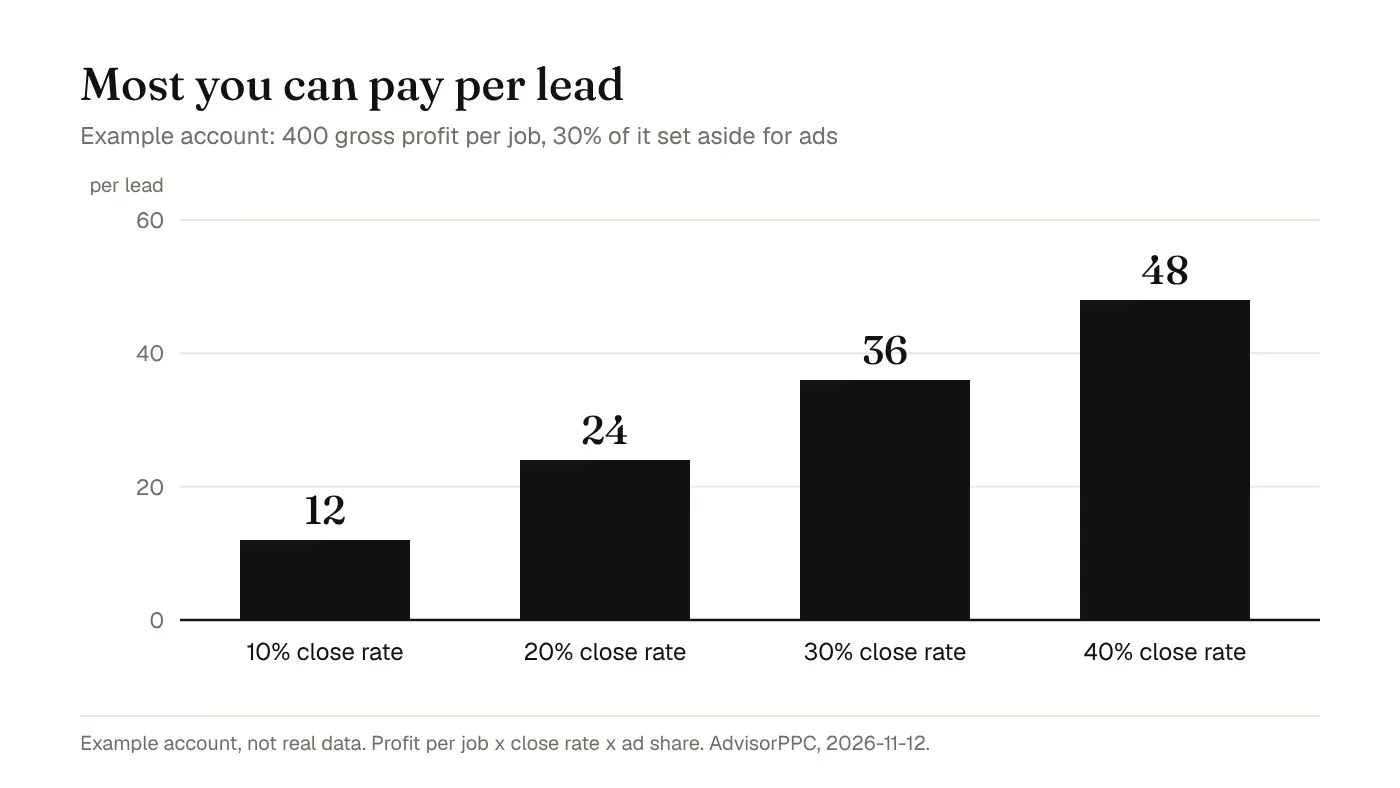
Decide what share of a job's profit you are willing to spend to win it. This is your choice, not a rule. In the example below the owner sets aside 30%, and keeps the rest as the reason the work is worth doing. Then multiply: profit per job, times close rate, times the share for ads. The result is your ceiling for cost per lead.
In the example below, a job is worth 400 in gross profit and the owner is willing to spend 30% of that on ads. At a 10% close rate, the most they can pay per lead is 12. At 40%, it is 48. The same ad account can be a good or a bad investment depending entirely on what happens after the lead arrives.
Look at what that means in practice. Improving how quickly you call people back, or how well you qualify them on the phone, can raise the ceiling more than any change inside Ads Manager. Our post on missed calls and wasted ad budget is about Google, but the follow-up problem it describes is the same on Meta.
Run your own numbers
Move the sliders to match your business. The weekly figure is the budget you would need to buy your chosen number of leads if they cost exactly your ceiling. Real costs will land above or below it, which is what your first test will tell you.
Gross profit per job$400
Leads that become paid work20%
Share of profit for ads30%
Leads you want per week10
- Most you can pay per lead
- $24
- Weekly budget at that cost
- $240
- Daily budget at that cost
- $34.29
How big should the first test be?
A test is only useful if it produces enough leads to judge. Five leads tell you almost nothing: one good call or one bad week swings the result. As a rule of thumb we use, aim for enough budget to collect at least twenty to thirty leads at your ceiling before you decide whether the channel works. That is our working rule, not a Meta requirement.
Meta also has its own view of volume. Its delivery system goes through a learning phase while it works out who to show an ad set to, and it needs a certain number of optimization events in a set period to finish learning. The exact figure can change, so read the current number on Meta's learning phase guidance rather than trusting a number from an old course. Our guide to the Meta Ads learning phase explains what to change and what to leave alone while it runs.
If the budget your calculator gives is far below what it would take to reach that volume, you have three honest options. You can optimise for an event that happens more often, such as a lead rather than a booked job. You can run one ad set instead of splitting the money across several. Or you can accept that the test will take longer. What you should not do is spread a small budget across five audiences and read meaning into each one.
What changes the cost per lead?
Cost per lead on Meta comes out of an auction. Meta sets out what that auction weighs in its explanation of the ad auction. Whatever the auction's exact inputs, the things a small business controls are these:
- The offer. A clear reason to enquire now, such as a free quote with a named turnaround, usually beats a general brand message.
- The creative. A real photo of your work, your van or your team tends to be more believable than stock imagery.
- The audience size. Very narrow targeting can make each result more expensive because there are fewer people to show the ad to.
- The destination. A slow or confusing page after the click wastes paid attention. If you send people to your site, the advice in our mobile landing pages guide applies just as much to Meta traffic.
- Tracking. If leads are not recorded correctly, Meta optimises toward the wrong thing. See Meta Pixel vs Conversions API for how to check it.
Daily or lifetime budget?
Meta lets you set a budget per day or for the whole life of a campaign. A daily budget is easier to reason about for an always-on lead campaign because it maps onto the weekly figure from the calculator. A lifetime budget suits a fixed promotion with a start and end date. Either way, check in Ads Manager how the budget you chose is paced on your account before you approve it, rather than assuming every day spends exactly the same.
How to judge the test
When the test has run, compare three numbers: what you spent, how many leads came in, and how many of those leads turned into paid work. Divide spend by paid jobs. If the cost per paid job is under the share of profit you set aside, the channel is earning its place and you can grow it slowly. If it is above, look at the follow-up before blaming the ads.
| Measure | Example figure | How it is worked out |
|---|---|---|
| Spend | 600 | From Ads Manager |
| Leads | 30 | From Ads Manager and your enquiry sheet |
| Cost per lead | 20 | Spend divided by leads |
| Paid jobs | 6 | From your own records |
| Cost per paid job | 100 | Spend divided by paid jobs |
| Ad budget per job (30% of 400) | 120 | Your rule from the first step |
In this example the cost per paid job sits under the ceiling, so the owner can raise the budget in small steps and keep watching the same three numbers. If the cost per paid job had been 200, the right first move would be to listen to a few of the calls, not to switch audiences.
Common mistakes
- Setting the budget first and working out the economics later.
- Judging Meta on cost per lead alone, when what pays the bills is cost per paid job.
- Changing the ads every few days, so nothing runs long enough to learn.
- Comparing Meta to Google without accounting for the difference in intent. Our Google Ads vs Facebook Ads guide covers that trade-off.
- Using revenue instead of profit, which makes every channel look affordable.
Is there a minimum budget for Meta Ads?
Meta may apply its own minimum for your currency and setup, and Ads Manager shows it when you set the budget. The more useful minimum is the one from your own sums: enough to collect the number of leads you need to judge the test.
Should I spend the same on Meta as on Google?
Not by default. Work out the ceiling per lead for each channel from your own close rates, and give each channel a test it can be judged on. Many small businesses end up with different budgets on each.
Can an AI assistant set my Meta budget?
It can do the arithmetic and propose a budget with its reasoning. You should still approve the amount, the account and the start date yourself. See approve every change for how AdvisorPPC handles that.
All figures in this guide are an example account, not real customer data and not a forecast. Meta's rules and thresholds change, so this guide states none of them; the linked Meta pages are the current source. Written 2026-11-12.