Published · 6 min read
PPC Management Software: Automate Checks, Review Changes
Use PPC management software to repeat useful checks. Separate alerts from budget decisions, preview rules and keep a named person reviewing booked work.
By the AdvisorPPC Team · Reviewed by Claude

Your campaign report is ready, but nobody has checked why the calls failed to become bookings. This PPC management software guide recommends automating repeatable checks while keeping business decisions with a named reviewer.
PPC means pay per click. The useful question is which part of managing those ads you want software to repeat. Start with a reliable observation, such as a dated spending report. Decide separately whether that observation justifies changing the account. A faster report is not evidence that a budget increase is sensible.
PPC management software should start with a repeatable check
Write down a task you already perform and the evidence you use to finish it. For example: review campaign spending for a stated period, compare it with your agreed plan, and flag anything that needs an explanation. Name the account and reporting dates before choosing a schedule.
Google's automated rules setup guide documents both account changes and notification emails triggered by conditions. That distinction matters: an alert can ask for attention without authorizing a budget edit. Check which actions your chosen software supports instead of assuming every alert needs an automatic fix.
For your first recurring task, request a report that names the source, shows the calculation and explains any missing information. Give the reviewer a clear place to find it. A check that nobody reads has no useful decision attached to it, even when it runs successfully.
Keep the task small enough to compare with the original records. If the report says a campaign needs attention, you should be able to find that campaign and reproduce the finding. Expand the workflow only after you understand what a successful run looks like.
Separate the alert from the decision to change spend
Use this illustrative worksheet for a local repair business. It is a proposed workflow, not a customer result or a feature promise. The business wants suitable repair inquiries that can become booked appointments. Its owner has not authorized any account changes.
| Observation to repeat | Decision to review | Evidence needed |
|---|---|---|
| Campaign spending differs from the agreed plan | Whether to change the budget | Reporting period, current setting and reason for the difference |
| Reported inquiries have fallen | Whether to alter ads or targeting | Tracking check and the types of inquiry actually received |
| An ad promotes an unavailable service | Whether to pause or replace it | Confirmation from the person managing appointment availability |
| A proposed change has been saved | Whether it matches the approval | Original setting, approved action and saved result |
The worksheet makes the next step explicit. A spending difference should lead to an explanation before an edit. A fall in inquiries should lead to a measurement check before a new advertising message. These are suggested review steps, not universal rules for deciding when to change campaigns.
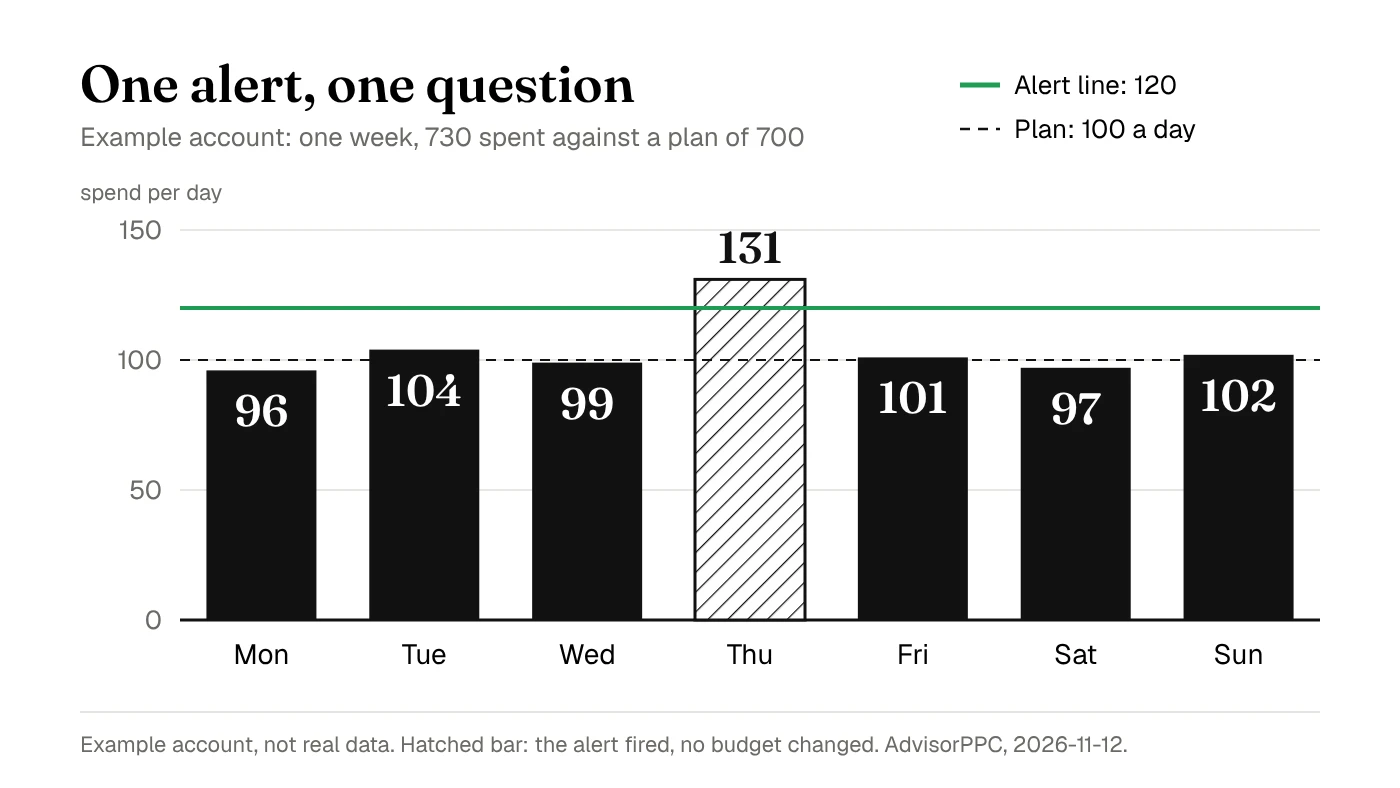
Here is the first row as an example account, not real data. The agreed plan is 100 a day, and an alert asks for a review when a day's spend passes 120. Over one week the campaign spent 96, 104, 99, 131, 101, 97 and 102, a total of 730 against a plan of 700. The alert fired once, on Thursday. The reviewer asked for the reason before deciding anything, and the budget stayed as it was.
Record the current setting alongside any proposal. Include the account, affected campaign, proposed value, reason, reviewer and review date. Someone reading the handoff later should understand exactly what was approved without reconstructing a conversation. Use the change receipts guide to structure that record.
Preview a rule before making it repeat
A rule is a saved instruction that acts when specified conditions match. Before enabling one, ask what it can touch, which reporting period it reads and how you would stop it. Inspect the actual proposed matches rather than relying on a reassuring name such as budget protection.
Google's tips for automated rules recommend previews, bid and budget limits, enough data, and a one-time run before recurring use. The same guidance warns that rules affecting the same items do not prioritize themselves. Inventory overlapping rules before adding another.
Apply that review method to your software: request a preview where supported, inspect a limited scope, and verify the saved result. A successful test should show both the intended match and an item that should remain untouched. Keep a copy of the original settings for comparison.
Do not treat a scheduled rule as an emergency spending brake. Google's automated rules examples describe a standard turnaround of up to two hours after conditions trigger. That is a Google rules limitation, not a measured promise about other software. Ask how delays and failures are reported before relying on a schedule.
Keep a person responsible for what the numbers mean
Decide who will check whether inquiries fit the service and become booked work. Software can only support that review when the relevant evidence is available. If your report contains clicks and form submissions, ask the office for the business outcome instead of treating every submission as a sale.
Ask the assistant or account manager to state uncertainty plainly. A missing date range, disconnected account or incomplete outcome record should become a question for the reviewer. Do not let a confident explanation hide a missing source. Resolve the gap before approving an action based on that explanation.
Keep offer changes, appointment availability and acceptable acquisition costs with the people who know the business. Those are inputs to the advertising decision. A recurring report can remind them to review the inputs, but the schedule cannot decide whether the business can accept another job.
This approach is a starting point for a small team, not a complete bidding strategy or a guarantee of better results. It does not establish what a particular connection can change. Choose a bounded first review from the Google Ads audit checklist, and verify the findings before extending the automation.
Use it inside Claude or ChatGPT
Ask Claude or ChatGPT to turn your recurring account check into this observation-and-decision worksheet, with a source for every finding. For setup, use AdvisorPPC in the Claude connector directory, the AdvisorPPC plugin for Claude Code on GitHub, or the page showing how to add AdvisorPPC in ChatGPT. Confirm the supported account and tasks before requesting a change.
What should I automate first with PPC management software?
Start with a repeatable observation you can verify, such as a dated spending comparison. Name the reviewer and expected next step before scheduling it.
Should an alert automatically change my campaign budget?
Only if you have deliberately authorized that exact workflow and understand its scope and limits. This guide recommends starting with an alert and a separate review decision.
Does this replace someone checking booked jobs?
No. Assign someone to connect the advertising report with suitable inquiries and booked work. Ask for missing outcome evidence before interpreting a campaign result.
Next, use the change receipts guide to write the first proposal your reviewer can check. Find my wasted spend free. Bring one recurring account question to that review.