Published · 6 min read
Ad Management Tool Checklist: Test Before You Commit
Use this ad management tool checklist to test account access, report accuracy, approval steps and handoffs before your small team commits.
By the AdvisorPPC Team · Reviewed by Claude
Your small team is trying an ad management tool, but the demo ends before anyone checks a real report. Use the six checks below to turn that trial into evidence you can inspect. This checklist helps business owners compare a working handoff with a polished presentation.
Start with one recurring job: preparing your weekly Google Ads review. Write down what you currently collect, who checks it and what decision follows. Ask the trial provider to complete that same job. A broad promise to save time is harder to evaluate than a report your colleague can use without another explanation.
The checklist is our editorial buying advice, not a certification or a performance ranking. The Google Ads details below come from the Google Help pages linked in each section. Other advertising platforms need their own checks; this article does not verify their permissions or reporting rules. For a shortlist by workflow, see our AI ad management software comparison.
An ad management tool checklist needs visible proof
Agree on the evidence before the trial starts. Use the worksheet below during a demonstration with your own authorized account, or with a clearly labelled sample account. Mark a row untested when you cannot inspect it. A verbal assurance is a question to follow up, rather than a completed check.
| Check | Ask to see | Evidence to keep |
|---|---|---|
| Account identity | Which advertising account supplied this answer? | Account identifier and named reviewer |
| Report accuracy | Can we match a report to the platform? | Date range, time zone, currency and filters |
| Business outcome | What does this report call a conversion? | Named conversion actions and the business result they represent |
| Permission to act | What can run without another approval? | Connection permissions and enabled automation settings |
| Change record | Can another person trace a proposed or completed edit? | Before and after values, target and execution status |
| Team handoff | Can a colleague continue from this report? | Source evidence, unknowns and the next responsible person |
You can run the reporting rows without approving campaign edits. If the trial includes an execution demonstration, agree on a separate safe test and its scope first. Do not change a working campaign merely to fill a worksheet. Ask the provider to mark unsupported actions plainly instead of substituting a different task.
Match a report before trusting its recommendation
Pick one completed reporting period and one campaign. Open the platform report beside the trial output.
Match the account, dates, currency, time zone, filters and column definitions. Keep the settings with the comparison so a colleague can repeat it. If the figures disagree, ask which source or definition explains the difference before drawing a spending conclusion.
A conversion is a recorded action, such as a submitted form. It does not automatically mean a paid customer.
Google distinguishes primary and secondary conversion actions. Primary actions appear in Conversions and are used for bidding when their standard goal is used. Secondary actions appear in All conversions and usually serve observation; a secondary action inside a custom goal can still be used for bidding.
Ask the trial to name the actions behind its headline total. Then have your team explain which actions represent a useful inquiry, a booking or a sale. If your booking records cannot yet connect those stages, record that gap.
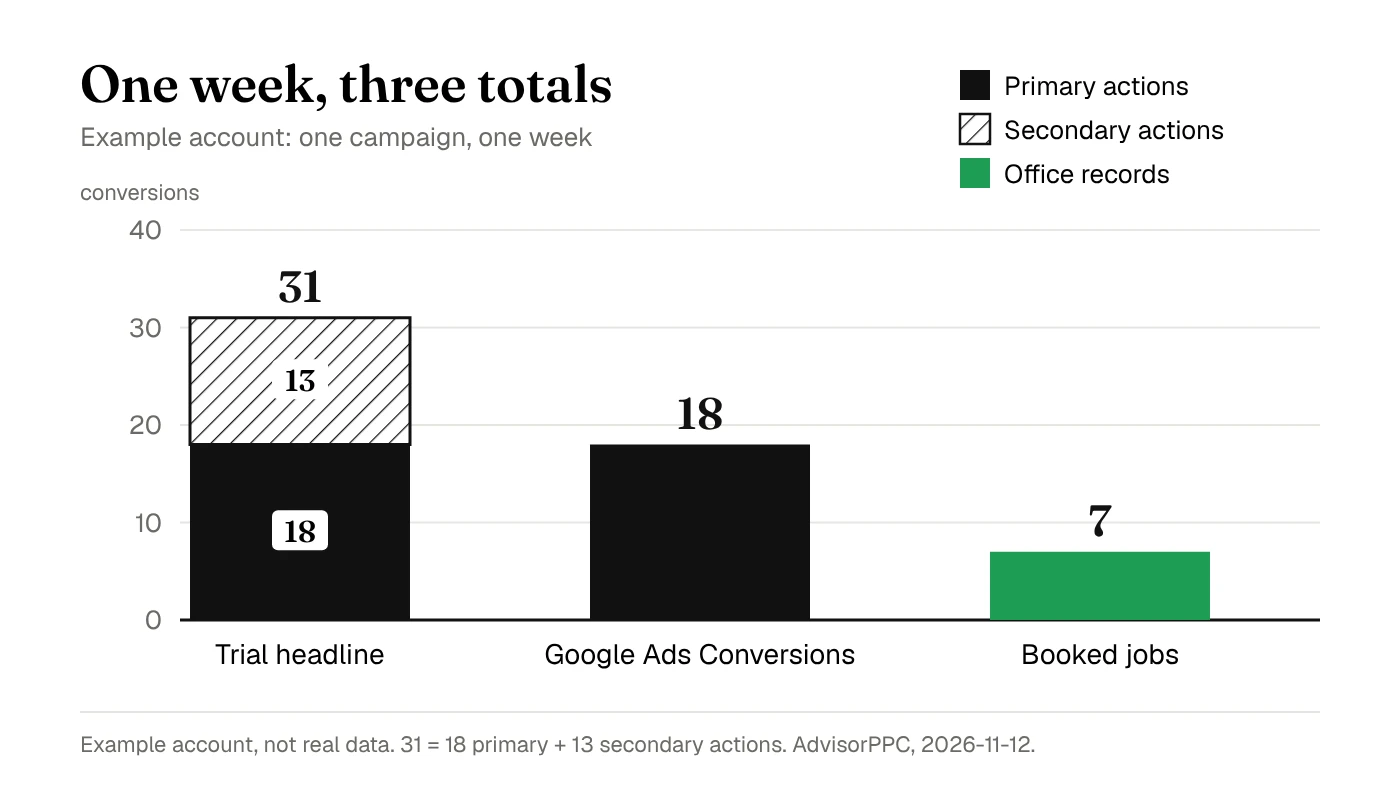
Here is how that looks in an example account, not real data. In one week, a trial report shows 31 conversions for one campaign. The Google Ads Conversions column shows 18: 12 form submissions and 6 calls, both primary actions. The other 13 are secondary actions that appear only in All conversions: 9 contact page views and 4 direction clicks. The office records 7 booked jobs for the same week. Each total answers a different question, so ask which one the trial is reporting before you compare anything.
Software cannot settle an undefined business outcome just by presenting a cleaner chart. For a practical review scope, use our Google Ads audit checklist.
Separate a recommendation from permission to act
Ask the provider to walk through one recommendation from evidence to decision. The review should name the target campaign, the current setting, the proposed setting and the reason. It should also say whether anything has actually changed. Save that record and ask a colleague to describe the proposed action without hearing the demonstration.
Check the underlying account permissions as well as the wording in the chat. Google Ads read-only access allows campaign viewing and reporting, while campaign editing requires Standard or Admin access. That describes Google's user access levels. It does not establish the permissions of a separate integration, which must be checked on its own.
Also inspect automation already enabled in the account. Google says auto-apply recommendations can run regularly after you enable them. This feature does not increase the budget, but its available categories include bidding and keyword changes.
A fixed budget alone does not prove that campaign settings stay untouched. Record enabled categories and who reviews them.
A useful handoff says what is still unknown
Finish the trial by handing its output to the person who normally covers your absence. Give them the report and its source details, without a spoken explanation. Ask them to identify the account, the business question, the proposed next action and who must decide. Any missing answer shows where the workflow still depends on its demonstrator.
Keep unresolved questions beside the finding. Examples include missing booking outcomes, an untested account connection or an action the integration cannot support. Do not turn missing information into a zero result.
Ask how your team can retrieve the evidence later and what happens to it when access ends. Treat those answers as trial requirements, not assumed features.
This exercise checks whether the workflow fits your team. It does not establish improved advertising returns, and one successful demonstration does not prove every account will behave the same way. Choose the next trial task from a gap you observed. Keep live spending decisions with the responsible account owner until the evidence supports a specific change.
Use it inside Claude or ChatGPT
Use this checklist to ask your assistant for a review brief: identify the account, compare report definitions and list missing evidence before suggesting changes. For setup, visit AdvisorPPC in the Claude connector directory, the AdvisorPPC plugin for Claude Code on GitHub, or the page explaining how to add AdvisorPPC in ChatGPT. State which worksheet rows you want checked, and ask it to mark unavailable evidence as untested.
Questions to settle before the trial ends
Should a small team test every feature?
Start with a recurring job that has a named reviewer and a clear output. Broaden the trial when that workflow is repeatable and you know which remaining gap matters.
Does a matching conversion total prove the leads are good?
No. Matching totals checks reporting consistency. Your team still needs to define which recorded actions lead to useful inquiries, bookings or sales.
Can we evaluate reporting without changing campaigns?
Yes. Compare reports and inspect definitions without approving campaign edits. Check the connection's actual permissions and any existing automation before connecting a live account. If the provider cannot explain the access it requests, leave that worksheet row untested and ask for a documented answer before continuing.
Choose your first trial question from the Google Ads search terms review, then save the account, dates and evidence beside your decision. Find my wasted spend free.